

Editable table
Status: ✅ Implemented — @InlineEditing
Intent
Section titled “Intent”Let users edit a collection — order lines, a price list, a roster, a set of parameters — directly in the table, so bulk and tabular editing is fast and stays in one place.
Problem
Section titled “Problem”By default, editing a row of an editable list opens a separate detail form: click the row’s Edit button, a form appears, change one value, save, close, repeat. That round-trip is fine for a rich record with many fields, but it is slow and clumsy for the very common case of a flat, tabular collection where the user wants to tweak a few cells across several rows. Every edit costs a modal, a context switch, and several clicks — the Desktop Denial of tabular data entry.
Solution
Section titled “Solution”Annotate the list field with @InlineEditing. Each row’s cells become editable inputs right in the
grid — no detail form, no per-row Edit button. The add / remove / reorder toolbar stays.
@InlineEditing@Stereotype(FieldStereotype.grid)List<OrderLine> lines;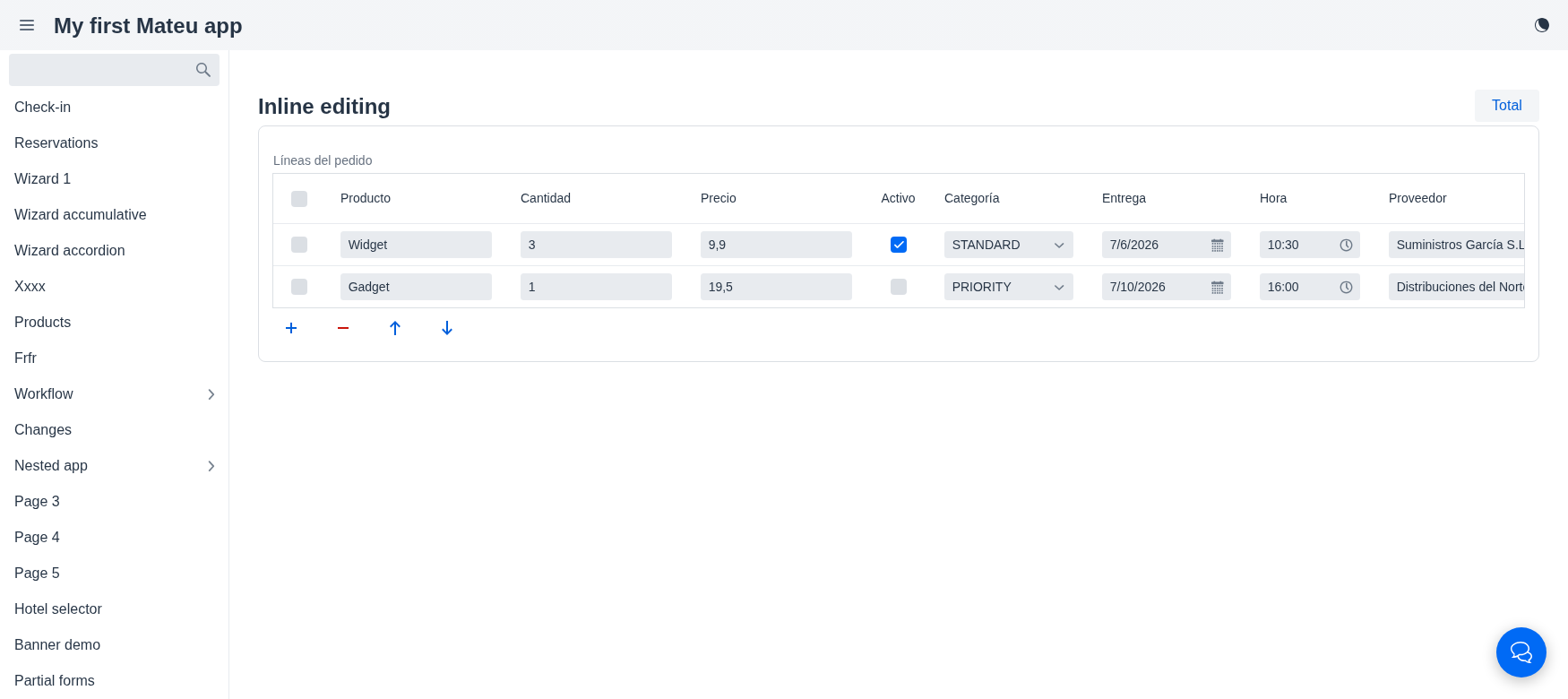
One editor per type
Section titled “One editor per type”The editor is chosen from each column’s real Java type, so every kind of field is editable in place:
| Type | Editor |
|---|---|
String | text field |
int / Integer / long | integer field |
double / BigDecimal / @Stereotype(money) | number field |
boolean | checkbox |
enum | combo box (the enum constants) |
LocalDate / LocalTime / LocalDateTime | date / time / date-time picker |
@Lookup (reference) | combo box with remote search-as-you-type — options come from the field’s LookupOptionsSupplier, the cell stores the id and shows the label |
A field marked @ReadOnly stays display-only.
Persistence — no per-cell save
Section titled “Persistence — no per-cell save”Inline edits travel back in the normal component state. There is no per-cell round-trip: the
edited rows are persisted whenever the enclosing form’s next action runs — a save/submit, or any
developer action that reads the list. So a @Toolbar “Save”/“Total”/“Recalculate” action already
sees the up-to-date collection.
When to use it
Section titled “When to use it”| Use inline editing | Use the detail form |
|---|---|
| Flat, tabular rows (few scalar fields each) | Rich rows with many fields, tabs, or validation-heavy sub-forms |
| Bulk edits across many rows | Editing one row at a time, carefully |
| Spreadsheet-like data entry | A row that is itself a small screen |
Inline editing is opt-in and per-field — a page can mix an inline-edited list with a detail-form-edited one.
Principles served
Section titled “Principles served”- Minimize navigation — edit in place, no modal per row
- Workflow over screens — the table is the task, not a launchpad to other screens
- Recoverability — edits live in state until an explicit action persists them