

Oracle Redwood
The Oracle Redwood renderer is built on Oracle Visual Builder — it renders Mateu screens with the
Redwood design system’s oj-* components (served from Oracle’s CDN) inside a Visual Builder app. Use
it when your UIs need to match Oracle Cloud applications or will be embedded inside existing Oracle
Redwood interfaces.
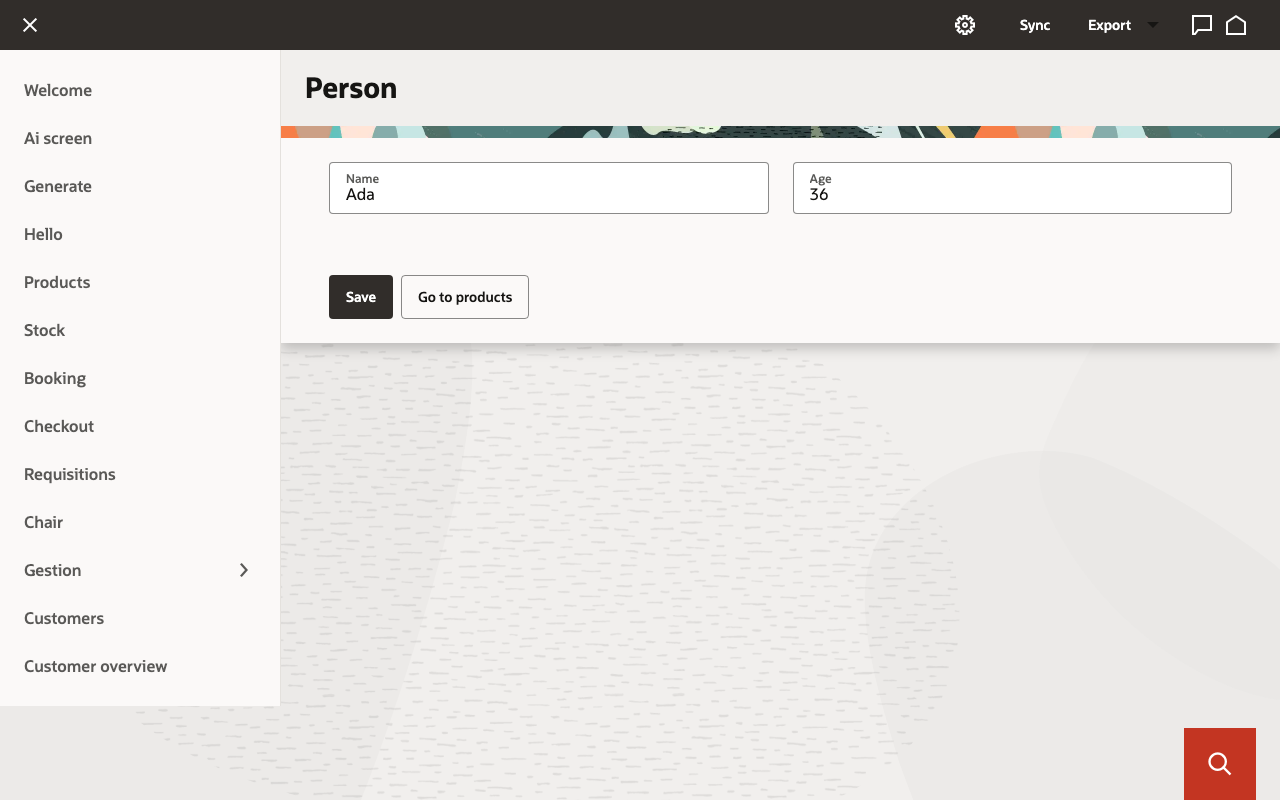
Demo: https://museums-rw.ec1.mateu.io/ (the same app on Vaadin: https://museums.ec1.mateu.io/)
Redwood’s RDS toolkit standardizes full-page templates (Collection Detail, General Overview, Guided Process, Create and Edit — Drawer…). Mateu builds those templates from the UI model — see the page templates map for the template → archetype mapping.
Two modes, one renderer
Section titled “Two modes, one renderer”| Standalone | Embedded | |
|---|---|---|
| What it is | A complete Visual Builder app (shell, menu, routes) in the redwood jar | <mateu-ui>, a JET Custom Component you import into your own Visual Builder app |
| Who owns the page | Mateu: the URL is the Mateu route, the shell is Mateu’s | Your VB app: its shell, its navigation, its URL; Mateu fills one area of a page |
| JET / Redwood / Spectra | Loaded from Oracle’s CDN by the packaged app | Your app’s — the component brings no second runtime and no iframe |
| How you get it | Maven dependency | mateu-ui-<version>.zip (attached to each release) |
Both paint the same screens with the same code: the component’s view is the standalone app’s content page and it runs the same action chains, so a screen looks and behaves the same in both.
Add to your project (standalone)
Section titled “Add to your project (standalone)”<dependency> <groupId>io.mateu</groupId> <artifactId>mateu-redwood</artifactId> <version>3.0.5</version></dependency>It replaces mateu-vaadin; the screens stay the same. The renderer’s files are on the classpath
under static/_redwood/ and are requested at /_redwood/*. Spring Boot, Quarkus and Micronaut
serve them with the setup their starters already have. Helidon MP maps one static folder in
microprofile-config.properties, so point it at Redwood’s instead of /assets (see
Helidon MP):
server.static.classpath.context=/_redwoodserver.static.classpath.location=/static/_redwoodEmbed Mateu screens in an existing Visual Builder app
Section titled “Embed Mateu screens in an existing Visual Builder app”Use this when the shell already exists — a Fusion extension, a VB app your team owns — and some of its pages should show screens that a Mateu backend serves (a listing, a form, a wizard, a whole CRUD).
1. Import the component
Section titled “1. Import the component”Download mateu-ui-<version>.zip from the release
(or build it: npm run build:embedded in frontend/web/monorepo/apps/redwood →
build/embedded/mateu-ui-<version>.zip). In Visual Builder, import it either way:
- Page Designer: open the Components palette, go to its Custom section and click the import icon; drop the zip in the dialog.
- Navigator: under your app’s Resources, right-click components → Import, and drop the zip.
It lands under resources/components/mateu-ui-<version>/ — the folder name carries the
version (mateu-ui-2604.1.3), so a newer zip is a new folder next to the old one. Visual Builder
lists the component in the palette (under Custom) and adds it to the page’s imports when you drop
it on a page. To add it by hand, use that folder in the page JSON:
"imports": {"components": {"mateu-ui": {"path": "resources/components/mateu-ui-<version>/loader"}}}
(after importing a newer zip, update the path and delete the old folder).
2. Drop it on a page
Section titled “2. Drop it on a page”<mateu-ui base-url="https://erp.acme.com/mateu" route="{{ $variables.mateuRoute }}" params="[[ { id: $variables.orderId } ]]" app-context="[[ { company: $application.variables.company } ]]" headers-provider="[[ $functions.mateuHeaders ]]" on-mateu-navigate="[[ $listeners.mateuNavigate ]]" on-mateu-title="[[ $listeners.mateuTitle ]]"></mateu-ui>Properties
| Property (attribute) | Type | What it does |
|---|---|---|
baseUrl (base-url) | string | The Mateu UI mount: its API is <baseUrl>/mateu/v3/…. Empty = the page’s own origin — except in the Visual Builder designer (see Design time below). |
route | string | The Mateu route, relative to the mount (orders, orders/:id). Empty = the app’s home. Written back when the screen navigates inside the component — bind it with {{ }} to follow it. |
params | object | Fills the route’s :placeholders; the rest travel as the query (a listing opens filtered by them). |
initialState (initial-state) | object | The component state the first load of the screen is sent with (a form opens pre-filled). |
appContext (app-context) | object | The app state (@AppContext: company, hotel, fiscal year…) sent with every request. Changing it reloads the screen. |
token | string | Sent as Authorization: Bearer <token> (a value with its own scheme, Basic …, as is). |
headers | object | Extra headers for every request (tenant, correlation id…). |
headersProvider (headers-provider) | function | (url) => headers or a Promise of them, called on every request — the way to pass a token that rotates. Wins over token/headers. |
withCredentials (with-credentials) | boolean | Sends the browser’s cookies to a backend on another origin. |
navigation | internal | host | Who handles a navigation the screen asks for (a row click, an action returning a route, a link). See below. |
shell | boolean | Draws the Mateu UI’s App shell inside the component: Spectra’s global header with the app’s logo, and the app’s title and menu as a band under it; navigation stays inside the component. For a page that is only the Mateu UI (e.g. a VB root page holding just <mateu-ui base-url="…">). Off (the default) inside a page that has a shell of its own. See below. |
base-url and route are trimmed: a space typed in the Properties pane does no harm.
Design time. When the page is Visual Builder’s designer — VB’s runtime booted in its edit
mode (the canvas opens the page with vbdt: query parameters; VB then maps its runtime environment
to the designer’s class, which the component reads, because VB’s router drops those parameters from
the URL), or the page is served under /ic/builder/design/ — the component never calls the page’s
own origin: that origin is Visual Builder, not a Mateu backend. Until base-url is set it makes no request and shows a light box
with its name and “Set the Backend base URL (and Route) to show a Mateu screen.” (in the page’s
language: English, Spanish, French, German, Portuguese or Italian). Once base-url is set it loads
the screen; if that request fails in the designer (a wrong or unreachable URL) the box stays, with
the reason, instead of Mateu’s error band. At run time (preview, a published app, a plain JET page)
nothing of this applies: an empty base-url means the page’s own origin, for a VB app served next
to its Mateu backend or behind the same proxy, and a failure shows the usual error band.
Changing route, params or initialState opens that screen; appContext reloads the current
one; baseUrl/withCredentials/shell start over; a new token/headers/headersProvider is simply used
from the next request on. Methods: navigate(route, params) and reload().
Events (JET convention: the type is camelCase, a page listens with on-mateu-…; all bubble)
| Event | detail | When |
|---|---|---|
mateuNavigate | {route, force} | The screen asks for another route. Cancelable. |
mateuAction | {actionId, parameters} | The user ran a Mateu action. |
mateuTitle | {title} | A new screen title — the page title is yours: show it where your page wants it. |
mateuMessage | {summary, message, type, displayMode} | A message for the user (also shown inside the component). |
mateuReady | {route} | The first screen is painted. |
mateuError | {kind, message, status} | A request failed (also shown in the component’s error band). |
Navigation. With navigation="internal" (the default) the screen navigates inside the component
and route is written back; mateuNavigate fires first, and a listener that calls
event.preventDefault() keeps the component where it is — for example to open the route in another
page of your flow instead. With navigation="host" the component never navigates by itself: it only
fires mateuNavigate, and your page decides (navigate its flow, or set route). Your page’s URL is
never touched either way: the component does not use the browser history.
The App shell (shell="true"). A Mateu UI that declares an App shell (@App, a YAML
type: AppShell) has a title, a logo and a menu. By default the component draws none of it — inside
a VB page the shell is the host’s. When the page is nothing but the Mateu UI, set shell="true": the
component draws Spectra’s oj-sp-global-header with the app’s logo, and under it the same menu band
the standalone Redwood renderer draws for MENU_ON_TOP (the app’s title, its top-level entries,
groups as menus, card menus). Choosing an entry navigates inside the component, like any other
navigation (mateuNavigate fires first and can be cancelled). Leave route empty to open the app’s
home. Inside the component every menu variant (HAMBURGER_MENU, MENU_ON_LEFT, RAIL, TABS…) is
shown as that top band, never as a navigator drawer or rail (the standalone renderer draws those);
TILES groups still open as card panels in it, and HAMBURGER_SECTIONS puts its sections in it as
top-level entries. Not drawn yet: the @AppContext pickers, header actions, the user menu, the
notification bell, the AI chat and the Ask palette are not part of it.
In shell mode the component scrolls itself. A VB app’s index stops the page body from scrolling
(.vb-web-applayout-body { overflow-y: hidden }) and expects the root page’s shell to provide the
scrolling area. When the page holds only <mateu-ui>, that area is missing. So with shell="true"
the component fills the height of its container, or the window from where it starts when the
container has no height. The header and menu band stay at its top and do not scroll; the content
under them scrolls, laid out as in the standalone app. Spectra’s sticky page and section headers
therefore stick right below the menu band, never behind it. Drawers, dialogs and
popups still open over the page (they live in JET’s popup layer).
Without shell the component flows in your page, and your page scrolls it.
3. Identity (your app’s user on the Mateu backend)
Section titled “3. Identity (your app’s user on the Mateu backend)”The component calls the Mateu backend from the browser, so the backend must be able to tell who the user is. Pass the identity your VB app already has:
-
A bearer token your app holds (OAuth/IDCS/OCI IAM token, a JWT from your gateway): bind
token="[[ $variables.accessToken ]]", or — if it rotates — useheaders-providerwith a page function, so it is read on every request:// the page module (main-page.js), bound as headers-provider="[[ $functions.mateuHeaders ]]"define([], () => {let accessToken = '';class PageModule {// call it from the action chain that obtains/refreshes the token (your security provider,// a service connection to your IdP…)setAccessToken(token) { accessToken = token; }// asked on every request (it is passed as a plain function: do not rely on `this`)mateuHeaders(url) { return { Authorization: 'Bearer ' + accessToken }; }}return PageModule;}); -
Cookies (the Mateu backend is behind the same SSO and shares the session cookie):
with-credentials="true", and on the backendmateu.cors.allow-credentials=truefor your origin.
On a 401 the component dispatches the cancelable mateu-session-expired event on document
(detail: {retry, giveUp}): refresh the token in your app and call detail.retry() — the request is
sent again once, with whatever your provider answers then.
4. CORS on the Mateu backend
Section titled “4. CORS on the Mateu backend”A VB app is served from another origin (https://<instance>.oraclecloud.com), so allow it:
mateu.cors.allowed-origins=https://myinstance-vb.builder.ocp.oraclecloud.com# only with with-credentials="true":mateu.cors.allow-credentials=trueSee configuration.
What the component does not do (limitations)
Section titled “What the component does not do (limitations)”- One
<mateu-ui>per page. The renderer core is a module with page-level state; a second instance on the same page takes over from the first (a warning is logged). - App shell only on request, and partial. By default the component draws no shell: the host
page has its own. Pass the context with
app-context; navigate withrouteor your own menu. Withshell="true"it draws the header (logo) and the menu as a top band (see above); the navigator drawer/rail variants,@AppContextpickers, header actions, user menu, notification bell, AI chat and Ask palette are not drawn. - Dialogs, drawers and toasts open in JET’s popup layer over the page, as any JET overlay of the host does.
- Requirements on the host page: JET 16 or later with the Redwood theme — the 16–19 line and
the 2604/2701 line Visual Builder runs today (JET reports itself as
2701.0.3-1there) —, the Spectra components (oj-sp, present in every Redwood VB app) and the Redwood icon font. On a plain JET page (not VB) the component points the missingoj-sp/oj-dynamic/oj-oarsmodule paths at Oracle’s CDN. Two libraries some Spectra components require under an id their host may not map —oj-fa-dom-purify(DOMPurify; Visual Builder does not map it) andpunycode(a plain JET page does not) — are pointed, only when missing, at the same libraries on cdnjs, pinned with their SRI hashes. - Licensing: the zip contains only Mateu code (Apache 2.0) — no file from Oracle. Inside your VB app it runs on your app’s JET, Redwood and Spectra, i.e. entirely under your Oracle agreement.
Manual test plan (a real Visual Builder instance)
Section titled “Manual test plan (a real Visual Builder instance)”The component is verified against two hosts served by npm run serve:embedded
(apps/redwood/embedded/harness): a plain JET page (JET 18.1 from Oracle’s CDN,
e2e/vb-embedded-probe.mjs), and a real Visual Builder app on the 2701 runtime — visual-runtime
2701.0.0-rc4.0 and rwdjet 2701.0.3-1 from Oracle’s public CDN, booted as a VB 2701 preview boots,
with a page that imported the component from resources/components/mateu-ui-<version>/
(e2e/vb-embedded-real-vb-probe.mjs: a listing with rows, a row opening its record, shell="true").
Not inside the Visual Builder designer. In a VB instance:
- Backend: run a Mateu app (e.g.
demo/demo-vb) reachable from the browser over HTTPS, withmateu.cors.allowed-origins=<your VB app origin>. - Import
mateu-ui-<version>.zip(Components palette → Custom → import icon, or Navigator → Resources → components → right-click → Import). Expect it in the palette’s Custom section as Mateu UI, with its properties in the Properties pane. - On a new page drop the component; set
base-urlto the backend androutetoproducts. Run the app (Preview): the listing renders with your app’s Redwood look, no console errors. - Click New: the create drawer opens over the page; fill Name, Save: the row appears.
- Bind
routeto a page variable with{{ }}, add a button that sets it toperson: the form renders; edit Name, Save: the message shows. - Add an event listener for
mateuNavigate(on-mateu-navigate) that logs$event.detail; on the person form click Go to products: the listener runs and the listing renders inside; the page URL does not change. Setnavigationtohost: the listener runs and the form stays. - Identity: protect the backend with your IdP; pass the token (
tokenorheaders-provider): requests carryAuthorization(browser network tab) and the screens load; with an expired token themateu-session-expiredevent fires. - On a page holding only
<mateu-ui base-url="…" shell="true">(noroute): the app’s header, title and menu show; choosing a menu entry opens its screen inside the component. - Design time: dropped on a page in the designer, before
base-urlis set, the component shows its placeholder box (“Set the Backend base URL…”) and makes no request; with a wrongbase-urlthe box says why the screen could not load; with a good one the screen shows on the canvas.
Characteristics
Section titled “Characteristics”- Modern Oracle Cloud look and feel
- Designed for data-dense enterprise UIs
- Builds the RDS page templates (Smart Search, Collection Detail, General Overview, Guided Process…) from the same archetypes as every other renderer
The colour strip
Section titled “The colour strip”Redwood pages carry a thin colour strip, a band of Redwood imagery that belongs to the page header
or the page template. The Guided process template guide (redwood.oracle.com, pageId=GUIDEC9,
“Display mode”) describes it as the strip at the top of the page, shown in the light display mode.
Redwood supports only its own colours and images there.
Spectra draws this strip itself, so Mateu does not add one over it:
- The page headers Mateu uses (
oj-sp-header-general-overview,oj-sp-header-create-edit) draw it under the header. That covers listings, record pages and create/edit pages. - The templates
oj-sp-guided-process(the RAIL wizard),oj-sp-hero-search-pageand the item overview page draw it at their top. - Pages whose template owns the whole page draw no strip, because Spectra draws none there. Those are the welcome page, the foldout layout and the dashboard landing page.
Mateu draws its own page header in one place, the horizontal wizard (title and train). There it
draws the strip at the top, where the guided process puts it, and copies the look of Spectra’s
header strip. The image is the theme’s --oj-sp-theme-page-header-strip when Spectra’s theme sets
one. Otherwise it is the generic strip from Oracle’s gallery, the same image Spectra ships. The
strip is 12px tall with rounded top corners, and 6px tall and square below 600px. It is loaded from
the Oracle CDN and never bundled, and an Oracle CDN mirror serves it
too.
To turn every strip off, Spectra’s and Mateu’s, use Spectra’s own switch: the
oj-sp-theme-appearance-override class on <body>, which marks a custom (non-Redwood) theme.
The Redwood shell has no footer, so there is no strip above one. Visual Builder’s default web layout does draw a strip over its footer.