

Planning board / tape chart
Status: ✅ Implemented
Intent
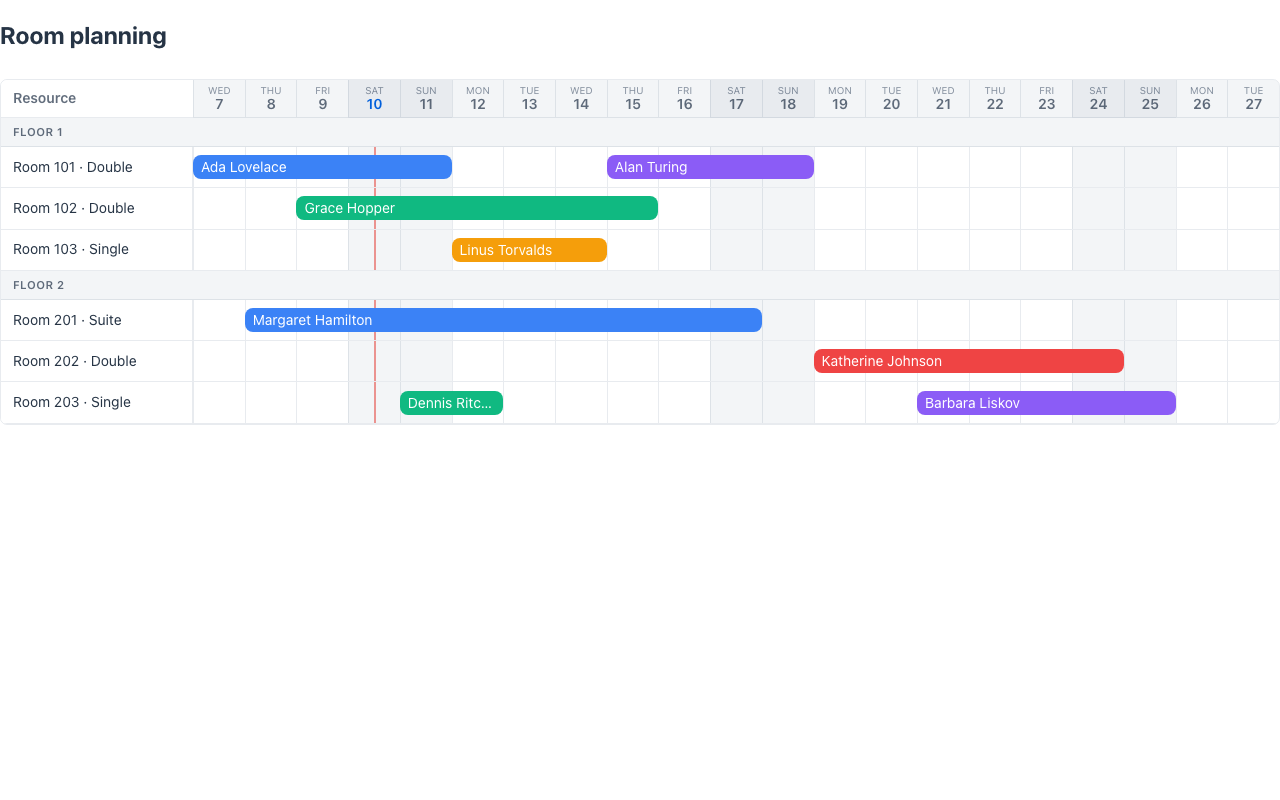
Section titled “Intent”Show and re-plan date-range assignments over a set of resources — the rooms × days grid every hotel, rental or staffing back-office needs. Rows are resources (rooms, vehicles, employees), columns are days, and each booking/assignment is a colored block spanning its dates. Overbooking gaps, free ranges and collisions are visible at a glance, and a block can be dragged to another room or day.
Solution
Section titled “Solution”Use the PlanningBoard component: a list of PlanningResource rows (with an optional group swimlane caption, e.g. the floor or the room type), a list of PlanningBlocks (each pointing at its resource by id and spanning start to end, inclusive), and the visible window (from/to; when omitted, the window is derived from the blocks).
@Section("Tape chart")Callable<Component> board = () -> PlanningBoard.builder() .from(LocalDate.now().minusDays(3)) .to(LocalDate.now().plusDays(17)) .resources(List.of( PlanningResource.builder().id("101").label("Room 101 · Double").group("Floor 1").build(), PlanningResource.builder().id("102").label("Room 102 · Double").group("Floor 1").build(), PlanningResource.builder().id("201").label("Room 201 · Suite").group("Floor 2").build())) .blocks(bookings.stream() .map(b -> PlanningBlock.builder() .id(b.id()).resourceId(b.room()) .start(b.start()).end(b.end()) .label(b.guest()).color(b.color()).status(b.status()) .build()) .toList()) .moveActionId("moveBooking") .selectActionId("openBooking") .build();The renderer is dependency-free (plain CSS grid), themes through the standard CSS variables, and works in dark mode. The resource label column stays pinned while the days scroll horizontally; weekends are tinted, today is marked, and hovering a block shows its label, dates and status.
The action contracts
Section titled “The action contracts”Both interactions are opt-in — a board without action ids is read-only.
Select (selectActionId): clicking a block runs the action with the block’s id:
parameters: { _blockId: "b3" }Move (moveActionId): blocks become draggable (a dashed ghost previews the target row/days while dragging; Escape cancels, and dropping a block back where it started is a no-op). Dropping runs the action with the target resource and the new dates — same duration, ISO-8601:
parameters: { _blockId: "b3", _resourceId: "202", _start: "2026-08-05", _end: "2026-08-11" }The handler is a plain @Action method: read the parameters, mutate the model, and re-render:
@ActionObject moveBooking(HttpRequest httpRequest) {    var params = httpRequest.runActionRq().parameters();    var booking = findBooking(String.valueOf(params.get("_blockId")));    booking.moveTo(            String.valueOf(params.get("_resourceId")),            LocalDate.parse(String.valueOf(params.get("_start"))),            LocalDate.parse(String.valueOf(params.get("_end"))));    return List.of(new State(this), new Message(booking.guest() + " moved"));}
@ActionObject openBooking(HttpRequest httpRequest) {    var booking = findBooking(String.valueOf(            httpRequest.runActionRq().parameters().get("_blockId")));    return new Message(booking.guest() + " · " + booking.start() + " → " + booking.end());}
Reject an invalid move by returning a Message without changing the data — the board re-renders from the unchanged model, snapping the block back.
When to use it
Section titled “When to use it”Use a planning board when the question is “who/what is where, when” and the answer must be re-arrangeable in place: room planning, fleet assignment, shift/staff allocation, equipment rental. For monitoring the progress of scheduled work (one row per task, not per resource), use the Gantt instead; for status-lane workflows use the Kanban.
Demo: /planning-demo in demo-admin-panel (RoomPlanning.java) — 6 rooms grouped by floor over 3 weeks; drag a booking to another room/day and the demo data updates.