

Wizard
Status: ✅ Implemented
Intent
Section titled “Intent”Guide sequential flows where each step depends on what was chosen in earlier steps.
Problem
Section titled “Problem”An onboarding flow where step 3 depends on what was selected in step 1 cannot be safely collapsed into one large form — the user could advance without completing required choices, or see irrelevant fields. Jumping between pages with no intermediate validation breaks the flow.
Solution
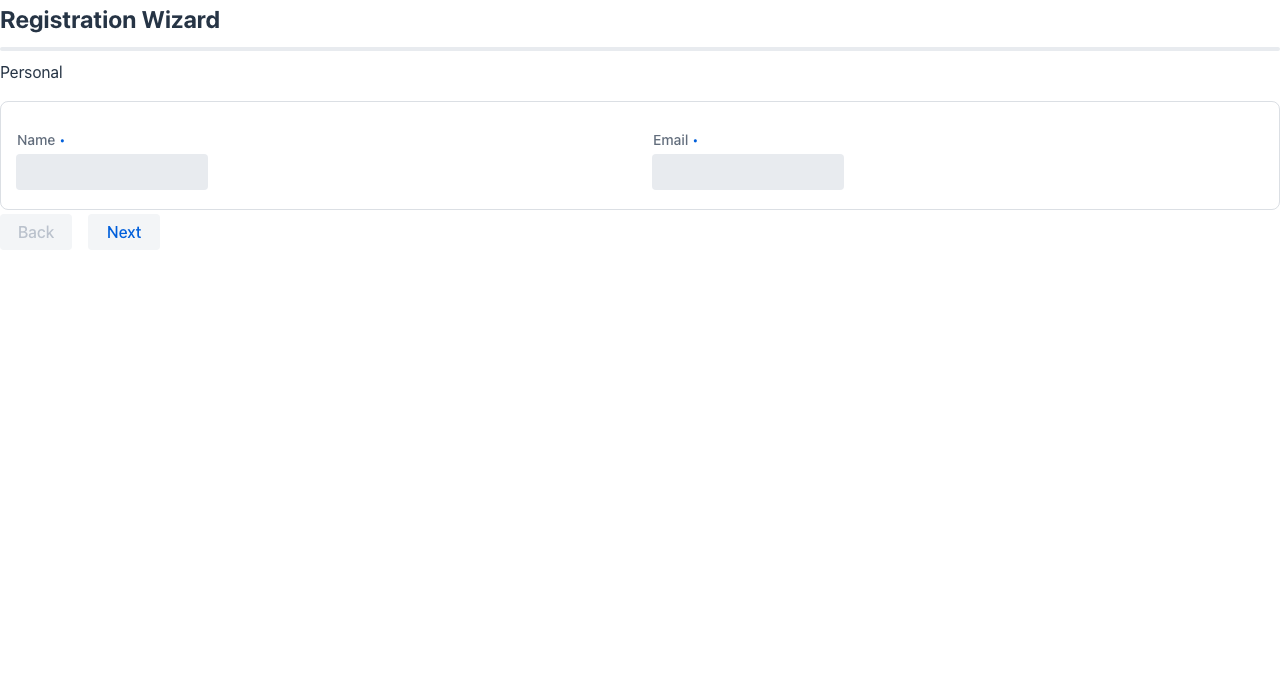
Section titled “Solution”Extend Wizard and declare one field per step; each field’s type must implement WizardStep. Mateu renders the current step’s form, a progress indicator, and navigation buttons automatically. The progress indicator is a bar by default; annotate the wizard with @WizardProgress(WizardProgressStyle.STEPS) to show connected step bullets instead (one numbered dot per applicable step with done/current/upcoming states — skipped branching steps are excluded, and every dot shows done on the result screen), or @WizardProgress(WizardProgressStyle.RAIL) for the guided-process lateral rail: the step form on the left and a sticky right-hand band with a big current | total counter over the vertical step list (demo: /branching-wizard). In the Redwood renderer STEPS draws the steps as a horizontal train across the top of the page (an oj-train; done steps can be clicked to go back, and on narrow screens the same steps are listed vertically), with the wire’s Back / Next / completion buttons in the footer; RAIL draws the Oracle Redwood Guided Process page template (oj-sp-guided-process): the wizard opens on its overview — the wizard’s title and @Subtitle over the steps as columns side by side, a completed step marked as such — and Start (or Resume) opens the steps one at a time with the step list on the right; the template’s own texts (Start, Continue, Cancel, Completed) follow the browser’s language. In both renderers Next only leaves a step whose required fields (@NotNull, @NotEmpty, @NotBlank, RequiredSupplier) are filled in: the browser marks the empty ones and focuses the first, and the server checks them again before moving on (an error message names them). The Back and Next labels go through the app’s Translator like every other Mateu text (Back=Atrás / Next=Siguiente in a messages_<lang>.properties), or the wizard fixes them with @WizardLabels(back = "Atrás", next = "Siguiente"); the completion button’s label is its method’s @Label. State set in any step — by the user or by an action — survives navigation in both directions and reaches the completion action, so steps can freely read what earlier (or later) steps produced.
// Each step is a plain class or record implementing WizardSteppublic class AccountTypeStep implements WizardStep {
    @NotNull    AccountType accountType;}
public class CompanyDetailsStep implements WizardStep {
    String companyName;    String vatNumber;}
// Result step — read-only screen shown after completionpublic class OnboardingResult implements WizardStep {
    @PlainText String summary = "Account created successfully.";}
// The wizard class@UI("/onboarding")public class OnboardingWizard extends Wizard {
    AccountTypeStep step1 = new AccountTypeStep();    CompanyDetailsStep step2 = new CompanyDetailsStep();    OnboardingResult result;   // null → auto-instantiated after @WizardCompletionAction
    @WizardCompletionAction    @Action(validationRequired = true)    Object finish() {        accountService.create(step1, step2);        result = new OnboardingResult();  // optional: set explicitly for custom data        return null;    }}
How it works
Section titled “How it works”| Step position | Behaviour |
|---|---|
| Any intermediate step | Shows Next → (and ← Back after step 1). Validation runs on Next →. |
| Penultimate step | Shows the @WizardCompletionAction button instead of Next →. |
| Last step | Read-only result screen. No navigation buttons. Progress bar shows 100 %. |
The last step is instantiated automatically with its default field values if it is null when @WizardCompletionAction returns — or the wizard can set it explicitly inside the completion method.
The completion method’s return value decides where the wizard goes:
| Returns | Result |
|---|---|
null | The result step. |
Message.error(...) (or any other object) | That answer, and the wizard stays on the step. |
A Flux — typically a LongTask | The progress streams live, then the result step. If the stream emits a Message.error, the wizard stays on the step instead. |
A completion method declared to return a Flux is advertised as an SSE action, so the client receives the progress as it is produced:
@WizardCompletionAction@Label("Run end of day")Flux<?> run() { if (!cashiers.closeAll) { return Flux.just(Message.error("Close the open cashiers first.")); } return LongTask.create("Running end of day") .withProgressBar() .run(progress -> Flux.fromIterable(procedures) .map(p -> progress.step(p.run(), p.index() / (double) procedures.size())));}The result step is built once the stream is over, so whatever the work set on the wizard while it ran (here, the status of each procedure) is on the result screen. Streamed completions are Java-only: the .NET and Python ports have no LongTask.
The wizard title is derived in order: @Title annotation → TitleSupplier.title() → class name.
Branching — conditional steps
Section titled “Branching — conditional steps”Override stepApplies(String stepFieldName) to skip steps based on the answers so far. A skipped step is jumped over in both directions (Next and Back), excluded from the progress bar, and left out of the accordion / previous-answers recap in the other layout modes. The result step always applies.
public class SignupWizard extends Wizard {
    AccountTypeStep account = new AccountTypeStep();   // asks PERSONAL / COMPANY    CompanyDetailsStep company = new CompanyDetailsStep();    PlanStep plan = new PlanStep();    ResultStep result;
    @Override    protected boolean stepApplies(String stepFieldName) {        if ("company".equals(stepFieldName)) {            return account.accountType == AccountType.COMPANY;   // skip for personal accounts        }        return true;    }
    @WizardCompletionAction    @Action(validationRequired = true)    Object finish() { /* … */ return null; }}
stepApplies is evaluated on every render and navigation, so it can depend on values captured by any earlier step. When the skipped step was the penultimate one, the completion button moves to the last applicable step automatically.
Layout modes — @WizardLayout
Section titled “Layout modes — @WizardLayout”By default a wizard shows one step at a time. Annotate the class with @WizardLayout(...) to change
how it’s laid out:
@WizardLayout(WizardLayoutMode.ACCUMULATIVE)public class OnboardingWizard extends Wizard { … }| Mode | Behaviour |
|---|---|
STEPS (default) | Only the current step is shown, one at a time. |
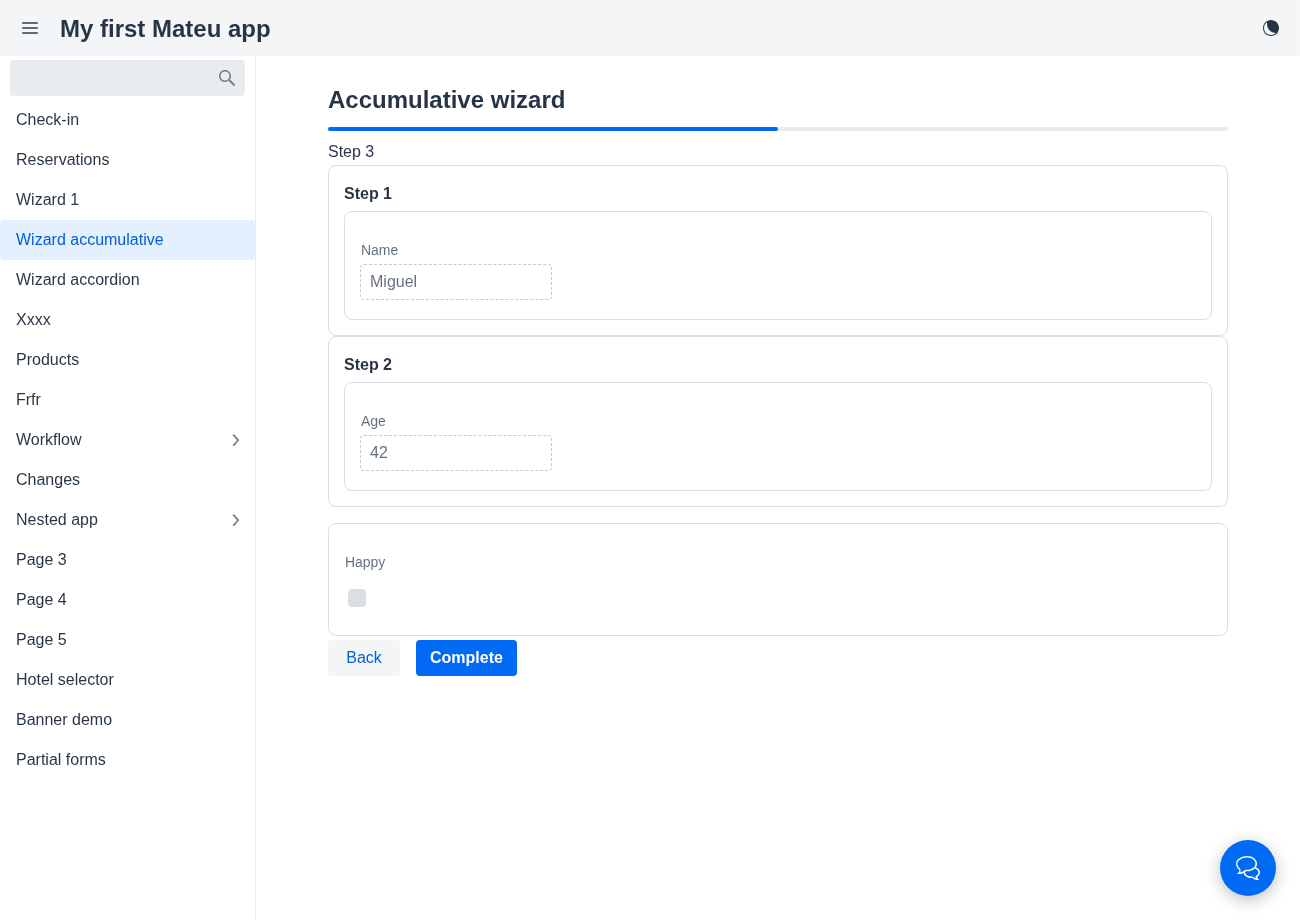
ACCUMULATIVE | The current step is editable, with a single compact “Previous answers” recap card above it — every completed step’s values listed as dense label: value lines, grouped by step — so the user always sees what has been collected so far without it dominating the screen. |
ACCORDION | Every step is a collapsible panel: the current one is open and editable, completed ones are collapsed (expand to review), upcoming ones are disabled. As you advance, the previous panel collapses and the next opens. |
ACCUMULATIVE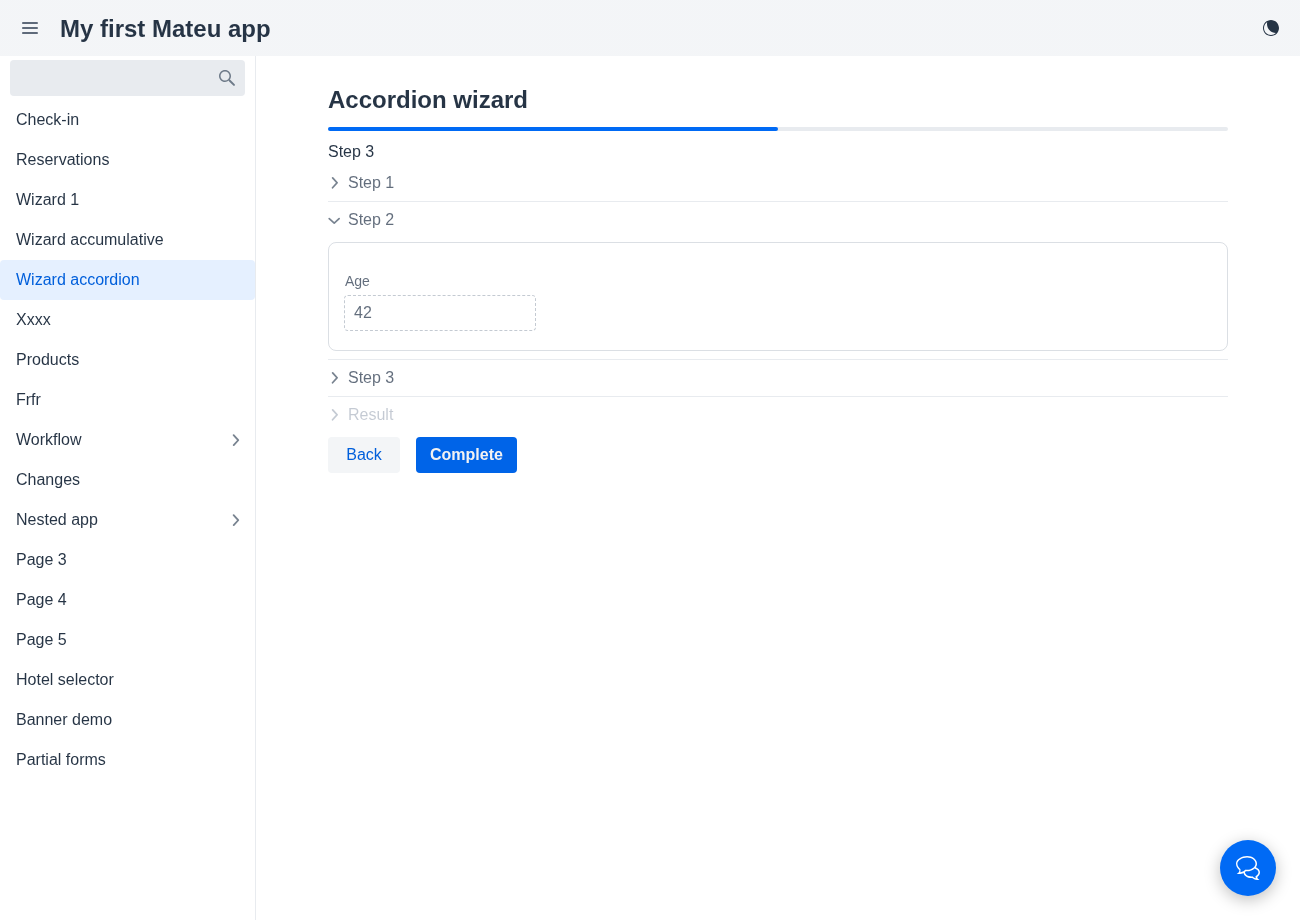
ACCORDIONBoth non-default modes render previously entered data read-only; steps should use distinct field names (the wizard state is a single flat map across steps).
Drafts, skipping and finishing early (the transactional guided process)
Section titled “Drafts, skipping and finishing early (the transactional guided process)”Four affordances turn a wizard into a process the user can leave and come back to — the transactional half of the Redwood guided process. All of them are ordinary buttons composed on the server, so every renderer draws them with its own widgets.
@UI("/onboarding")@WizardProgress(WizardProgressStyle.STEPS)public class Onboarding extends Wizard implements Draftable {  Contact contact = new Contact();  Preferences preferences = new Preferences();  Extras extras = new Extras();  Done done;
  // Draftable: "Save" and "Save and close" on every step  @Override public Object saveDraft(HttpRequest rq) { drafts.save(this); return null; }  @Override public Object closeDraft(HttpRequest rq) { return URI.create("/home"); }  @Override public String resumeStep(HttpRequest rq) { return drafts.lastStepOf(rq); }
  // "Skip" on the optional steps  @Override protected boolean stepSkippable(String step) { return "preferences".equals(step); }
  // cancelable hook before ANY move: null lets it happen, anything else is the answer  @Override protected Object beforeStepNavigate(String from, String to, HttpRequest rq) {    return "contact".equals(from) && contact.email.endsWith("@blocked.test")        ? Message.error("That e-mail domain is not allowed") : null;  }
// offered beside Next from the preferences step on @WizardCompletionAction(availableFromStep = "preferences") @Label("Finish now") Object finish() { ... }}| Piece | What it does |
|---|---|
Draftable.saveDraft(rq) | ”Save”: the current step is hydrated but not validated (a draft may be incomplete); null answers “Draft saved” and the wizard stays put |
Draftable.closeDraft(rq) | where “Save and close” lands after saving (a URI or a UICommand; null = /); the page is marked clean first |
Draftable.resumeStep(rq) | the step (field name) a fresh load opens on — the one the user left |
stepSkippable(step) | ”Skip”: moves on without requiring that step’s fields. Unlike stepApplies, the step is still there — the user chose to leave it for later |
@WizardCompletionAction(availableFromStep = "…") | the completion is offered beside Next from that step on |
beforeStepNavigate(from, to, rq) | runs before Next, Back, Skip, a jump to a visited step and the completion (whose to is the result step), after the step is hydrated and — going forward — its required fields checked. Return null to proceed; anything else cancels the move and is the response |
Display options (WizardDisplay)
Section titled “Display options (WizardDisplay)”Every built-in affordance of the wizard can be switched with the shared tri-state Toggle
(on · off · disabled = shown but inert, which is what permissions need):
@Override protected WizardDisplay display() { return WizardDisplay.defaults().toBuilder() .saveDraft(canWrite ? Toggle.on : Toggle.disabled) .saveAndClose(Toggle.off) .build();}saveDraft, saveAndClose and skip default to on (each shows only where the wizard supports
it). A disabled affordance is refused on the server too, not just greyed out.
Structure
Section titled “Structure”Account setup ← getTitle()[●────────────────────] Step 1 / 3 ← progress bar
Account type: ○ Personal ● Business
[Next →]Account setup[────●────────────────] Step 2 / 3
Company name: ___________ VAT number: ___________
[← Back] [Create account] ← @WizardCompletionActionAccount setup[──────────────────────●] Done
✓ Account created successfully. ← no navigation buttonsRedwood parameter and slot reference
Section titled “Redwood parameter and slot reference”What the Redwood guided-process template exposes, and what Mateu gives you for it. The gaps here
are the transactional ones — drafts, resuming and skipping — which is the largest coherent piece
of Redwood surface Mateu does not cover. The canonical page-header elements shared by every template
are documented once in Page templates.
Legend: ✅ supported · 🟡 partial · — not supported · ⚪ deliberately out of scope
| Redwood prop / slot | Mateu | |
|---|---|---|
processTitle / processSubtitle | getTitle() / @Title | ✅ |
steps[] / currentStep | step fields; numberOfSteps(), currentStepNumber(), getStep() | ✅ |
displayOptions.checklistDisplay: current | all | @WizardProgress(BAR | STEPS | RAIL) picks the progress presentation | ✅ |
| Conditional steps | stepApplies(stepFieldName) — branching | ✅ |
| Completion step | Slot completionStep ↔ @WizardCompletionAction + the done state | ✅ |
| Validation before advancing | validations() runs before the step advances | ✅ |
avatar + displayOptions.avatar | PageDto.avatar/icon on the canonical header | 🟡 |
primaryAction.availableFromStep (enable the finish action from step N on) | @WizardCompletionAction(availableFromStep = "…") | ✅ |
resumeStepId (resume where the user left off) | Draftable.resumeStep(rq) | ✅ |
displayOptions {save, saveAndClose} + spSave / spSaveAndClose (drafts) | Draftable.saveDraft / closeDraft + WizardDisplay.saveDraft / saveAndClose | ✅ |
spSkip {skippedStepId} (user-initiated skip) | stepSkippable(step) + WizardDisplay.skip | ✅ |
spBeforeNext / spBeforeStepNavigate (cancelable hooks) | beforeStepNavigate(from, to, rq) | ✅ |
completionStatus / continueWorkingStatus | the done state is terminal | 🟡 |
displayOptions.overviewAnimation | — | — |
displayOptions.density: standard | compact | @Compact, set on the view rather than as a template option | 🟡 |
Slot announcement (aria-live) | return UICommand.announce(text) / announceAssertive(text) from any action | ✅ |
The related step-by-step-page template (a full-screen linear process) adds timer {startTime, timeInterval} for timed processes and spFinishLater; neither is built. For a wizard inside a
drawer, see Guided Process Drawer.
Coverage
Section titled “Coverage”| Java | .NET | Python | Vaadin | Redwood | React Native | IntelliJ | |
|---|---|---|---|---|---|---|---|
| Steps, branching, progress (BAR / STEPS / RAIL) | ✅ | ✅ | ✅ | ✅ | ✅ | ✅ | ✅ |
Drafts (Draftable: save, save and close, resume) | ✅ | ✅ | ✅ | ✅ | ✅ | ✅ | ✅ |
Skip (stepSkippable) | ✅ | ✅ | ✅ | ✅ | ✅ | ✅ | ✅ |
Early completion (availableFromStep) | ✅ | 🟡 ¹ | ✅ | ✅ | ✅ | ✅ | ✅ |
beforeStepNavigate | ✅ | ✅ | ✅ | ✅ | ✅ | ✅ | ✅ |
WizardDisplay toggles | ✅ | ✅ | ✅ | ✅ | ✅ | ✅ | ✅ |
The renderer columns need no wizard-specific code: every affordance is a button composed on the
server. ¹ The .NET and Python wizards number their steps ([Step(n)]), so the hooks take step
numbers instead of field names, and .NET’s early completion is the fixed complete action.
Principles served
Section titled “Principles served”- Progressive complexity — each step shows only what is needed at that moment
- Recoverability — validation fires before advancing, not at the end
- Workflow over screens — the wizard models a task, not an entity