

Application context selector
Status: ✅ Implemented
Intent
Section titled “Intent”Fix a value at APPLICATION level — the active hotel in a PMS, the company in a multi-tenant ERP, the business unit, the fiscal year — so every screen of the app works against it without asking again.
Problem
Section titled “Problem”Without an app-level context, every listing and form needs its own “which hotel?” filter, users re-select it on every screen, and nothing guarantees two screens agree on the value.
Solution
Section titled “Solution”Annotate a field of the @UI app class with @AppContext. It renders as a compact selector on
the app header (next to the theme toggle), visible on every screen:
@UI("")@Title("My first Mateu app")public class BackofficeApp {
    @AppContext(label = "Hotel")    HotelSelector hotel;      // options from a LookupOptionsSupplier
    @AppContext    Environment environment;  // or simply an enum: its constants are the options}
The field’s type provides the choices:
- An enum — its constants become the options.
- Any class implementing
LookupOptionsSupplier— searched once with an empty text (first page) when the app shell is built:
public class HotelSelector implements LookupOptionsSupplier { @Override public ListingData<Option> search(String fieldName, String searchText, Pageable pageable, HttpRequest httpRequest) { return ListingData.of(hotels.stream() .map(h -> new Option(h.id(), h.name())) .toArray(Option[]::new)); }}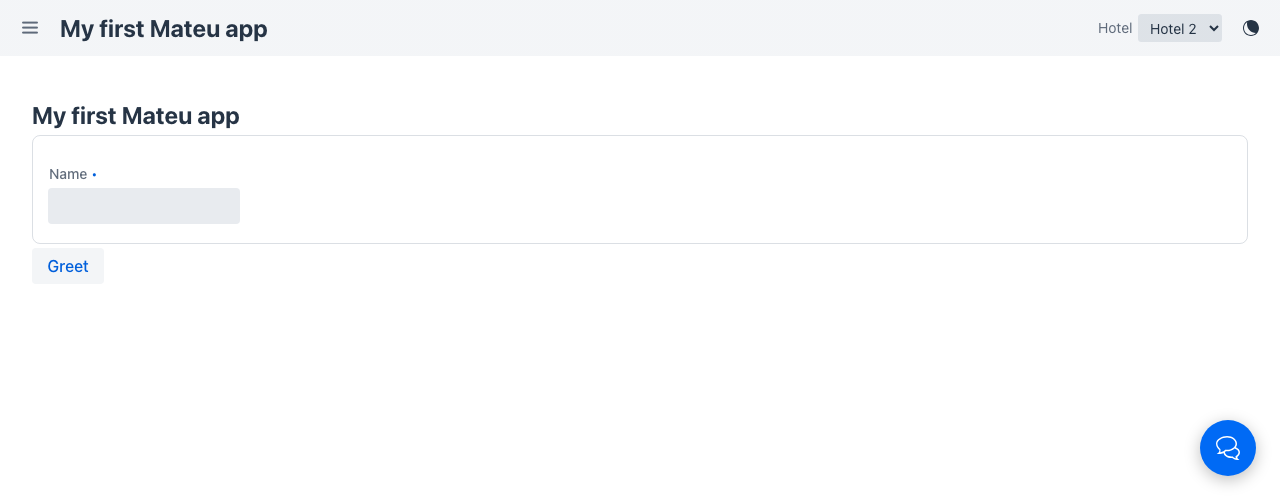
Reading the context
Section titled “Reading the context”The selected option’s value lives in the app state under the field’s name and travels with
EVERY request, so any screen or action reads it from the HttpRequest:
@Buttonpublic Message greet(HttpRequest httpRequest) { var hotel = httpRequest.appContext("hotel"); // "2", or null when nothing is selected ...}An AutoCrud typically uses it inside store()/search(...) to scope the data — the widget
stays fully decoupled from the screens.
Behaviour
Section titled “Behaviour”- Compact select or searchable picker — up to 7 options render as a plain select; more options
render as a button opening a searchable panel: typing filters the loaded options and asks
the server for matches beyond the first page (the
_appcontext-search-<field>action, answered by the field’sLookupOptionsSupplieror the enum constants). - Persistent — the selection (and its label) is stored client-side (one entry per origin) and survives reloads, navigation and new tabs.
- Uniform reactivity — picking a different value reloads the current route, so whatever screen the user is on rebuilds against the new context. No per-screen wiring.
- Cross-tab sync — when another tab of the same origin changes the context, every open tab reloads and rebuilds against the new value.
- Explicit app state wins — the persisted context is merged under any appState entries the components set programmatically.
- Several
@AppContextfields render several selectors (e.g. hotel + fiscal year).
Header actions
Section titled “Header actions”Next to the context selectors, the app can contribute action buttons to the header: implement
AppActionsSupplier on the @UI app class. Each actionId names a public method of the app class
(same dispatch as a @Fab); an action with children renders as a dropdown menu — only the
children dispatch. The supplier is evaluated on every shell build, so actions can appear and
disappear with server-side state.
@UIpublic class BackofficeApp implements AppActionsSupplier {
  @Override  public List<AppHeaderAction> appActions(HttpRequest httpRequest) {    return List.of(        new AppHeaderAction("sync", "Sincronizar", "vaadin:refresh"),        AppHeaderAction.menu("Más", "vaadin:ellipsis-dots-v", List.of(            new AppHeaderAction("deploy", "Desplegar"),            new AppHeaderAction("purge", "Purgar caché"))));  }
  public Message sync() { ... }   // runs when the header button is clicked}
Actions returning a Flux stream their increments over SSE with the on-screen component as the
initiator, so long pipelines (a deploy, a batch job) update their progress dialog as they happen.
The .NET and Python backends emit the same contextActions wire field:
public class BackofficeApp : IAppActionsSupplier{ public IReadOnlyList<AppHeaderAction> AppActions() => [new AppHeaderAction("sync", "Sync now", "refresh"), AppHeaderAction.Menu("Export", "download", [new AppHeaderAction("exportPdf", "As PDF"), new AppHeaderAction("exportExcel", "As Excel")])];}class BackofficeApp(AppActionsSupplier): def app_actions(self): return [AppHeaderAction(action_id="sync", label="Sync now", icon="refresh"), AppHeaderAction.menu("Export", "download", [ AppHeaderAction(action_id="exportPdf", label="As PDF"), AppHeaderAction(action_id="exportExcel", label="As Excel")])]In YAML
Section titled “In YAML”A data-authored shell (type: AppShell) declares the same pickers and header buttons as data —
contextSelectors: (static options or an optionsSource REST source) and headerActions:
(each navigates with route, or runs a shell flow / action-catalogue entry with actionId). See
App shell as data › Header extras.
Java only: the .NET and Python servers have no type: AppShell.
Other servers
Section titled “Other servers”The pattern is wire-level, so the .NET and Python backends emit the same selectors:
[App("Backoffice")]public class BackofficeApp{    [AppContext("Hotel")]    public IReadOnlyList<OptionDto> Hotel() => hotels.Select(h => new OptionDto(h.Id, h.Name)).ToList();
[AppContext] public Environment Environment { get; set; } // enum property}@app("Backoffice")class BackofficeApp: @app_context("Hotel") def hotel(self): return [(h.id, h.name) for h in hotels] # or Option(...) objects, or an Enum return typeNative renderers
Section titled “Native renderers”The native shells render the same wire field:
- React Native — selectors at the top of the drawer; session-scoped, picking a value remounts the current screen.
Like the web picker, a selector with more than 7 options gains a search box: typing filters
the loaded options and (debounced) asks the server for matches beyond the loaded page via the same
_appcontext-search-<field> action — React Native shows it under the drawer selector.
Principles served
Section titled “Principles served”- Workflow over screens — set once, applies everywhere
- Recoverability — the context survives reloads; no re-selection tax
- Single source of truth — screens can’t disagree on the active context
See also
Section titled “See also”- Audience projection — an
@AppContextfield namedaudiencebecomes a persona switch:@Audience-marked fields, buttons and menu entries filter to the selected audience (unset → everything visible).