

Filters & Listing
Status: ✅ Implemented
Intent
Section titled “Intent”Locate and operate on records with minimal effort.
Problem
Section titled “Problem”A listing without live filters, row actions, and bulk actions forces users to navigate to each record individually to do anything. High-volume workflows become impractical.
Solution
Section titled “Solution”Use @List for the collection class, @Filterable on filter fields, a ColumnActionGroup column on the row for per-row actions, and @ListToolbarButton for bulk actions. Column display is controlled with @ColumnWidth and @HiddenInList.
@UI("/products")public class ProductsListing extends AutoCrud<Product> {    @Override    public CrudStore<Product> store() {        return new ProductStore(); // your CrudStore<Product>    }
    @ListToolbarButton(rowsSelectedRequired = true, confirmationRequired = true)    public void deactivateSelected(List<Product> selected) {        selected.forEach(p -> p.setActive(false));        repository.saveAll(selected);    }}
public class Product {
@Filterable private String name;
@Filterable private ProductCategory category;
@HiddenInList private String internalNotes;
@ColumnWidth("80px") private boolean active;}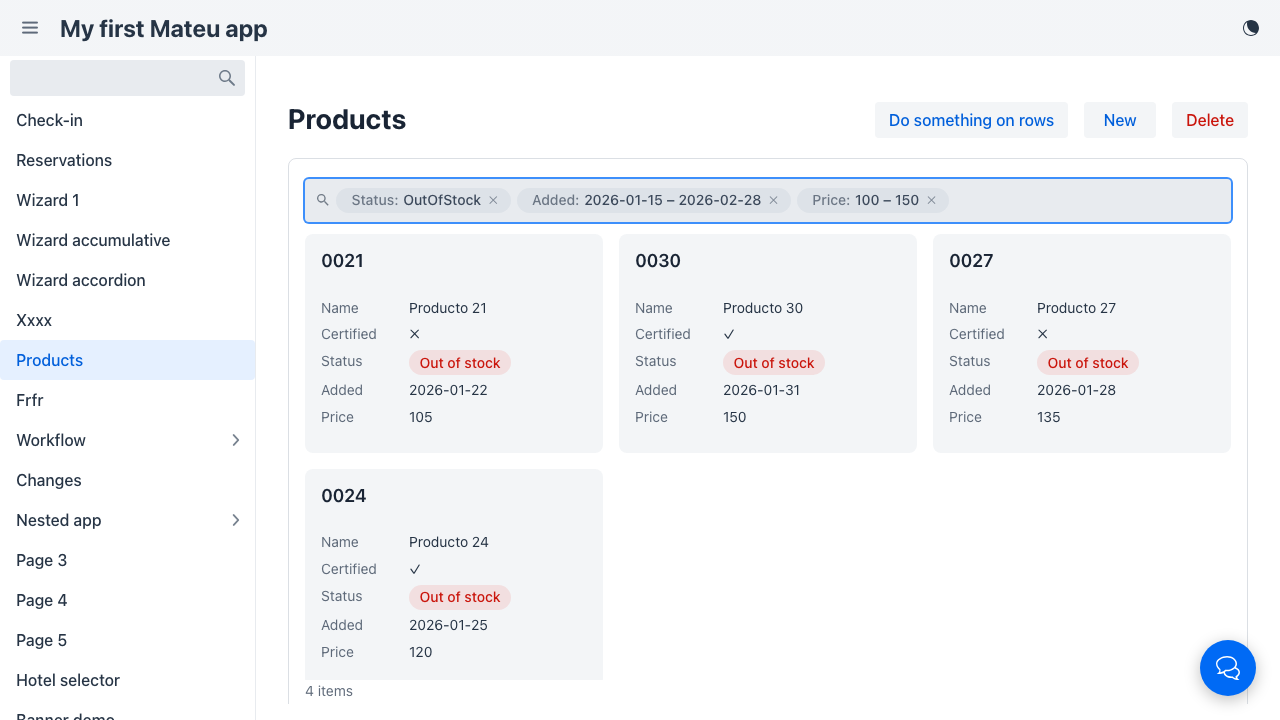
The smart search bar
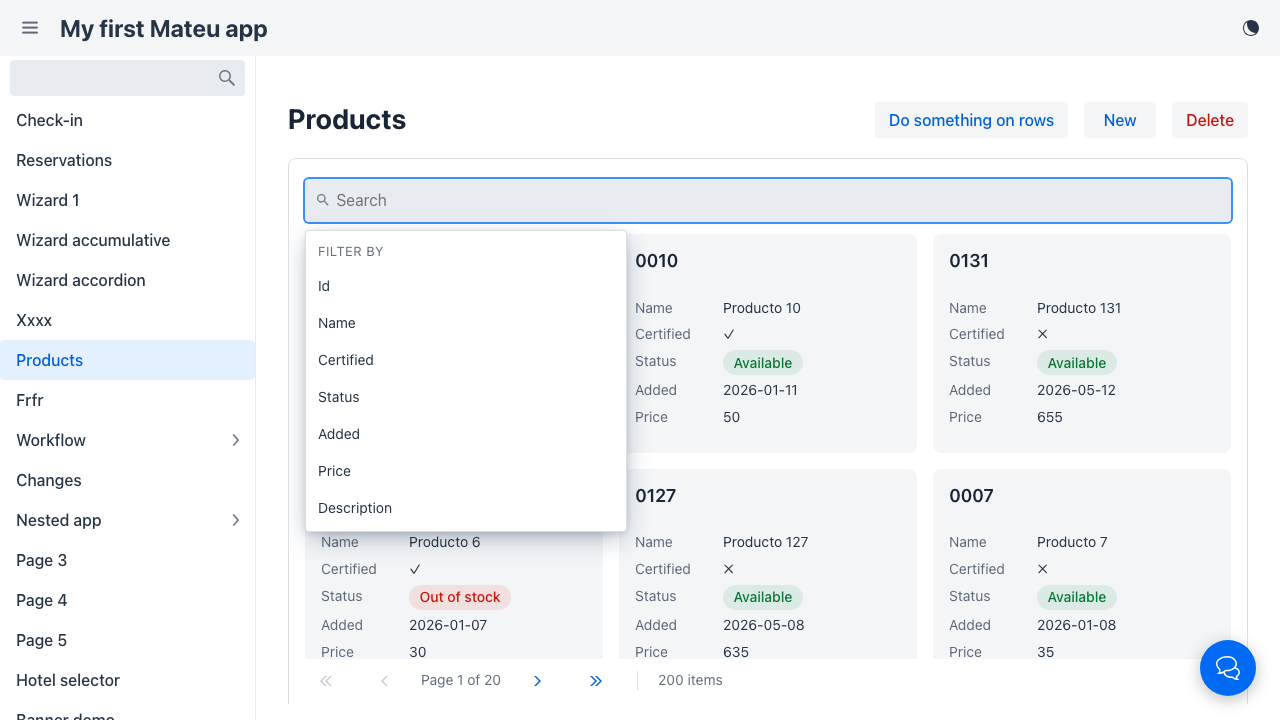
Section titled “The smart search bar”Filters render as a single search field (after the Redwood Smart Search pattern), not as a row of inputs. The one field hosts both the free-text keyword search and the structured filters:
- Type and press Enter to apply a keyword search (matched against
SearchableText.searchableText()ortoString()). Several words search for rows containing all of them, case-insensitively and in any order — “13 producto” finds “Producto 13”. - Click the field to open the Filter by panel listing every filter. Picking one opens a type-specific widget. Filters already set show their current condition next to their name.
- Every applied condition becomes a chip in the bar with its own ✕. Adding or removing a chip re-runs the search immediately, so conditions compose (e.g. keyword + status + a date range).
- Clear filters at the bottom of the panel resets everything at once.
Which fields become filters is decided server-side: every basic field and every enum of the
filters class — plus the explicit typed filter fields (DateRange, NumberRange, Set<SomeEnum>,
see below). The widget (and the condition semantics)
follow the field’s type:
| Field type | Widget | Condition | State / URL keys |
|---|---|---|---|
| String | text input + Apply | contains (case-insensitive) | name=widget |
| Boolean | Yes / No | equality | certified=true |
| Enum | multi-select (checkable options) | IN — any of the picked values | status=Available,OutOfStock |
Date/time (LocalDate, LocalDateTime, LocalTime) | from–to range | between / ≥ / ≤ | added_from=2026-01-15&added_to=2026-02-28 |
Number with @RangeFilter | min–max range | between / ≥ / ≤ | price_from=100&price_to=150 |
| Number (plain) | number input + Apply | equality | units=5 |
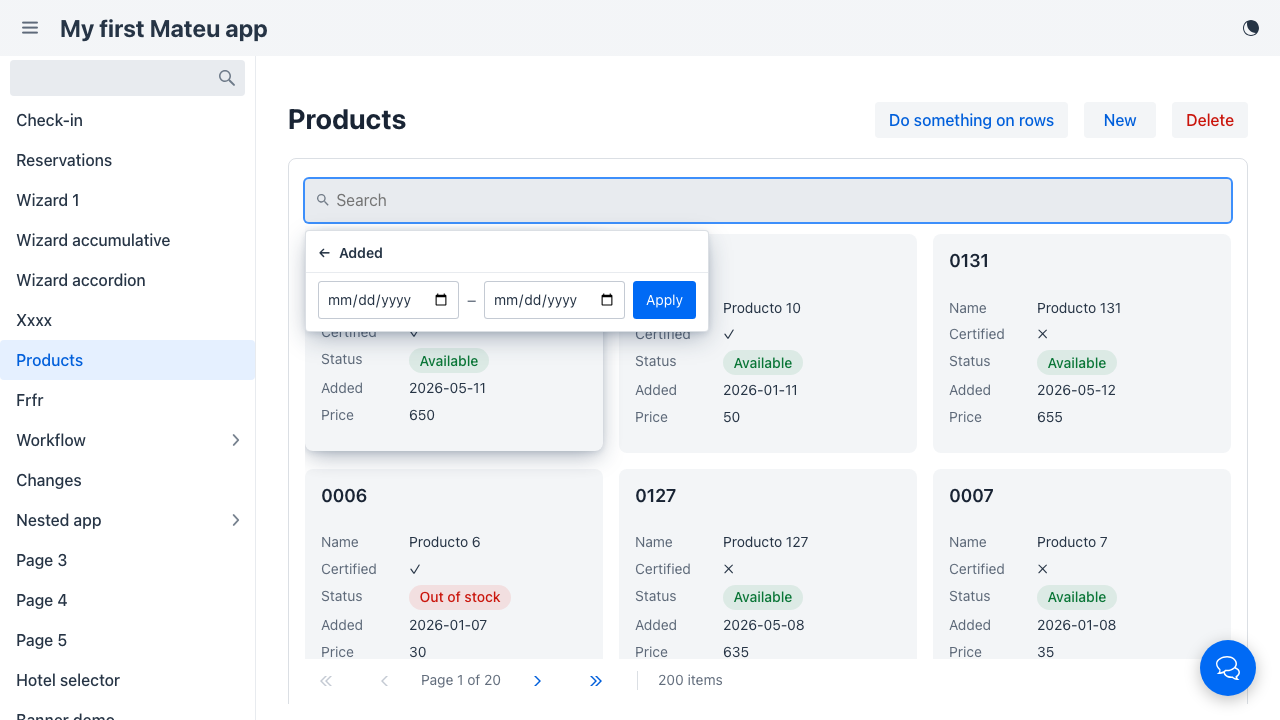
Temporal filters are ranges by default (equality on an exact instant is almost never what a
user wants); numeric ranges are opt-in via @RangeFilter on the entity field; enums are
multi-selects by default (picking a single value behaves exactly like equality). Because every
condition lives in flat state keys, the URL keeps capturing the full listing state — bookmarks and
shared links restore ranges and multi-selections too. There is nothing to configure on the
frontend — every renderer that ships the shared filter bar (Vaadin) gets this
UX, and the Redwood renderer implements the same pattern with its own design system.
Structure
Section titled “Structure”┌──────────────────────────────────────────────────────────────┐│ 🔍 (Text: widget ✕) (Category: Electronics ✕) [type here…] ││ ┌─ FILTER BY ──────────────┐ ││ │ Name │ ││ │ Category Electronics │ ││ │ Active │ ││ │ Clear filters │ ││ └──────────────────────────┘ │├──────────────────────────────────────────────────────────────┤│ ☐ Name Category Active [Actions] ││ ☑ Product A Electronics ✓ [Edit] [▼] ││ ☑ Product B Clothing ✓ [Edit] [▼] ││ ☐ Product C Electronics ✗ [Edit] [▼] │├──────────────────────────────────────────────────────────────┤│ [Deactivate selected] [New] [Export PDF] [Excel] [CSV] │└──────────────────────────────────────────────────────────────┘Clicking anywhere on a row of a navigable listing opens the record; the checkbox, inline editors and the action/button columns keep their own click. See the whole row opens the record.
Filtering on the default repository
Section titled “Filtering on the default repository”You don’t need to override anything for the filters to work: the default in-memory
CrudStore.find applies them. Two mechanisms cooperate:
- Equality filters travel inside the entity-shaped example object (query by example). A filter
counts as set when its value differs from a freshly-constructed instance of the filters
class, so field initializers and primitive zeros/falses don’t filter on their own. Strings match
by case-insensitive containment, everything else by equality. The flip side: filtering by a
field’s default value (e.g. an initializer like
status = AVAILABLE) needs an overriddenfind. - Ranges and multi-selects travel as
FilterCriterionentries (between/gte/lte/in, values already coerced to the field’s type) — an entity instance simply has no room for “between 10 and 50” or “any of A, B”. They reach the repository through the 4-argfind(searchText, filters, criteria, pageable)overload, whose default evaluates them in memory.
See CrudStore for pushing both to the database.
Typed filters on declarative listings
Section titled “Typed filters on declarative listings”The table above describes the AutoCrud path, where the entity doubles as the filters class and
Mateu infers the widgets. A capability listing
declaring Filterable<Filters> has its own Filters class — there the richer widgets are
opt-in by type: declare the field as DateRange, NumberRange
(both in io.mateu.uidl.data) or Set<SomeEnum> and it renders as a from–to range or a
multi-select, on any listing:
@Datapublic class BookingsFilters {    @Label("Created") DateRange created;      // from–to date widget    @Label("Total")   NumberRange total;      // min–max number widget    @Label("Channel") Set<Channel> channels;  // multi-select with the enum's options}
@UI("/bookings")public class BookingsListing implements Listing<BookingRow>, Searchable, Filterable<BookingsFilters> {    @Override    public ListingData<BookingRow> search(SearchRequest request, HttpRequest httpRequest) {        // filters(request) arrives fully typed — apply it however your data source needs        var filters = filters(request);        var rows = bookings.stream()                .filter(b -> filters.getCreated() == null || filters.getCreated().contains(b.created()))                .filter(b -> filters.getTotal() == null || filters.getTotal().contains(b.total()))                .filter(b -> filters.getChannels() == null || filters.getChannels().isEmpty()                        || filters.getChannels().contains(b.channel()))                .toList();        return ListingData.from(rows);    }}
On the wire the conditions still travel as flat state keys (created_from=…&created_to=…,
channels=WEB,PHONE), so URL sync, bookmarks and shared links keep working; before your
search(...) runs they are assembled back into the typed instances (FilterStateAssembler), with
open bounds as nulls. DateRange/NumberRange bring contains(...) and isEmpty() helpers for
in-memory application; against a database, translate the bounds into the query. Fields of other
types keep the classic single-value widgets.
Export
Section titled “Export”Override pdfExportable(), excelExportable(), or csvExportable() in your Listing class to show the corresponding export button. The framework reuses search() with the active filters to collect the data — no extra code needed.
public class ProductsListing implements Listing<ProductRow>, Searchable, Filterable<ProductFilters> {
    @Override public boolean excelExportable() { return true; }    @Override public boolean csvExportable()   { return true; }}
Mateu decides what is exported (the whole filtered result set, the visible columns) and delivers the file; writing it is your application’s job. CSV works out of the box (core carries a dependency-free CSV writer). Excel and PDF need a ListingExporter bean of yours, written with the library you choose — until one is registered the Excel / PDF buttons are simply not offered, so there are no dead buttons. See Export engines for the port and two implementations to copy (Apache POI, Apache PDFBox).
URL sync and saved views
Section titled “URL sync and saved views”Every time the user triggers a search, the listing updates the browser URL as query parameters. On page load the framework reads those parameters, pre-populates the fields, and triggers the search automatically.
The URL captures the full listing state:
| Parameter | What it stores |
|---|---|
| Filter field names | The value of each filter field (e.g. name=widget; a multi-select comma-joined, status=Pending,Cancelled; a range as <field>_from / <field>_to) |
searchText | The free-text search box value (a hand-written link may use q instead) |
ids | The framework’s id-set filter: exactly these rows (e.g. ids=4MBZS7,JXD3G6) — see below |
page | Current page number (omitted when 0) |
sort | Active sort as field:direction pairs (e.g. sort=name:ascending,date:descending) |
/products?name=widget&category=Electronics&page=2&sort=name:ascendingThis gives three capabilities for free:
- Saved views — bookmark any filtered URL; opening it restores filters, page, and sort.
- Shareable links — paste the URL in a chat or email; the recipient lands with the same state.
- Browser history — the back button returns to the previous filter state.
No server-side persistence of views is needed. The browser’s native bookmark manager is the saved-views feature.
Whatever opens the listing — a pasted link, the menu, the chat assistant — the URL wins: reaching a
listing that is already on screen with another query (/bookings → /bookings?status=Cancelled)
applies exactly the new query, and URL filters show as normal removable chips.
The id-set filter (?ids=…)
Section titled “The id-set filter (?ids=…)”ids works on every listing without declaring anything: /bookings?ids=4MBZS7,JXD3G6 shows
exactly those two rows, with a removable «Selection: 4MBZS7, JXD3G6» chip («N selected items» beyond
three). It is how a link — or an assistant that found some records with its tools, by any criterion
the listing has no filter for — shows a concrete set of records in their listing. It combines with the
declared filters and the search text.
- AutoCrud / CrudStore: applied by the store, as an
incriterion on the row’s id field. - Hand-written
search: read it fromrequest.ids()(empty when not set) and narrow your query (WHERE id IN (:ids)). If you don’t, the framework narrows the page your search returned to those ids — exact only when they all fit in that page, so honour it in the query for large listings.
What the menu says about each listing
Section titled “What the menu says about each listing”A menu entry that opens a listing carries a listing descriptor: its row id field, the ids param,
the search param and each declared filter as the query param it reads (type, enum values, range
bounds). The chat sends it in its menu context, so the assistant can open a listing already
narrowed instead of only the bare screen.
Known gaps
Section titled “Known gaps”- Segmented filter tabs with counts (“All / Waiting queue (3)”): there is no declarative
annotation for preset filter tabs over a listing.
@MainFilteronly highlights one search field. Saved views cover the preset part (named condition sets, no live counts); otherwise emulate with a filter field (enum or boolean), or withTaskQueue/QueueGroupwhen the grouped-queue shape fits.
(Row grouping by parent used to be listed here — it is now first-class: @GroupBy on a row
field renders group subtotal rows, and @Aggregate adds per-group and whole-set totals.)
Principles served
Section titled “Principles served”- Workflow over screens — act on data without leaving the list
- Keyboard-first — filters respond to Enter (the listing’s
searchOnEnter, on by default) - Recoverability — filter state, page, and sort survive navigation via URL sync; no Filter Amnesia