

Empty states & skeletons
Status: ✅ Implemented
Intent
Section titled “Intent”Never show the user a blank void: when a collection has no rows yet, explain why and offer the next step; while content is loading, show its shape instead of a spinner.
Empty states
Section titled “Empty states”Listings and grids render a friendly empty-state block automatically when they have no rows — set emptyStateMessage on the fluent Listing (or leave the default). For custom screens, use the EmptyState component:
@Section("Bookings")Component empty = EmptyState.builder()        .icon("📭")        .title("No bookings yet")        .description("When you create a booking it will show up here.")        .actionId("createBooking")        .actionLabel("Create your first booking")        .build();
@ActionObject createBooking() { return URI.create("/bookings/new"); }
The call-to-action dispatches the standard action mechanism — same contract as buttons and metric cards.
Skeletons
Section titled “Skeletons”Skeleton renders a shimmering placeholder that mimics the shape of the loading content. Variants: text (lines), card (a tile), grid (table rows), form (label + field pairs); count repeats the shape.
Component loading = new HorizontalLayout( Skeleton.builder().variant(SkeletonVariant.form).count(3).build(), Skeleton.builder().variant(SkeletonVariant.grid).count(5).build());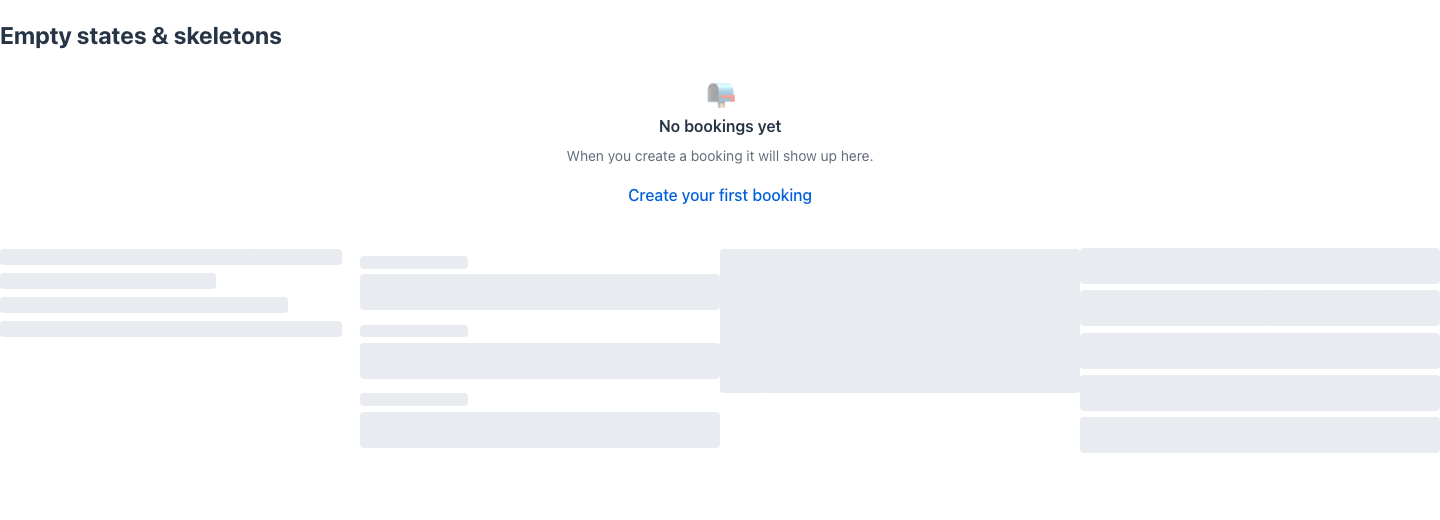
Use skeletons in place of content that arrives late — e.g. as the initial value of a component field that an OnLoad action replaces (return new State(this) with the real component once loaded).
When to use it
Section titled “When to use it”Show an empty state whenever “no results” is a normal situation (fresh accounts, filtered lists) — always say what the user can do next. Show a skeleton when you know content is coming and its shape matters; keep the built-in loader overlay for short, unpredictable waits.