

Validation Annotations
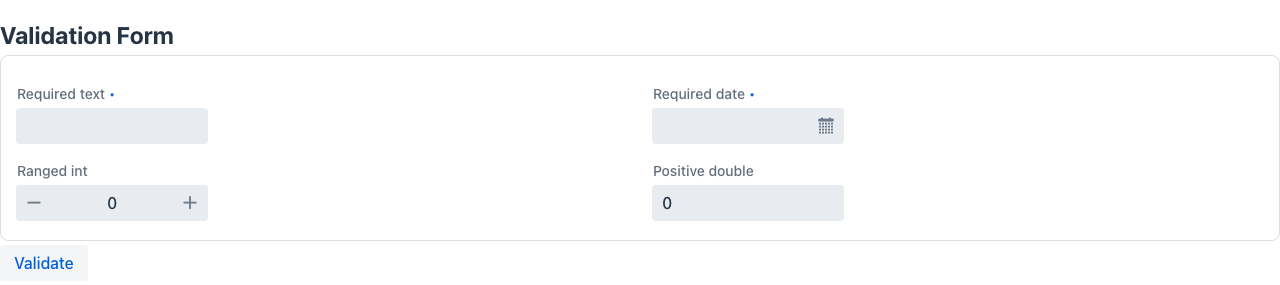
@Validation
Section titled “@Validation”@Validation is repeatable (via @Validations). It defines a cross-field validation rule on a class. The condition expression is evaluated after all fields are set; if it returns true the validation fails and the error message is shown on fieldId.
@Repeatable(Validations.class)@Retention(RetentionPolicy.RUNTIME)public @interface Validation { String condition(); // expression that returns true when validation FAILS String fieldId(); // field to mark as invalid String message(); // error message to display}| Attribute | Type | Description |
|---|---|---|
condition | String | SpEL or JS expression evaluated against the form data. Returns true to indicate a validation failure. |
fieldId | String | The field that will show the error message when the condition is met. |
message | String | Human-readable error message shown next to the field. |
@Validation( condition = "endDate != null && startDate != null && endDate < startDate", fieldId = "endDate", message = "End date must be on or after start date")public class DateRangeForm { LocalDate startDate; LocalDate endDate;}Multiple validations are stacked on the same class:
@Validation(condition = "endDate != null && startDate != null && endDate < startDate", fieldId = "endDate", message = "End date must be on or after start date")@Validation(condition = "amount != null && amount <= 0", fieldId = "amount", message = "Amount must be positive")public class BookingForm { LocalDate startDate; LocalDate endDate; double amount;}@Validations
Section titled “@Validations”Container annotation for multiple @Validation entries on the same class. Created automatically by the compiler when you stack @Validation — you rarely use it directly.
@Retention(RetentionPolicy.RUNTIME)public @interface Validations { Validation[] value();}@Rule is repeatable (via @Rules). It defines a conditional UI rule that runs entirely on the client side: when filter matches, the specified action is applied to a field’s attribute — visibility, value, CSS class, and more — without a server round-trip.
@Repeatable(Rules.class)@Retention(RetentionPolicy.RUNTIME)public @interface Rule { String filter(); // condition expression that activates this rule RuleAction action(); // what to do when filter matches String fieldName(); // target field RuleFieldAttribute fieldAttribute(); // which attribute to modify String value(); // static value to set String expression(); // dynamic expression to evaluate String actionId(); // action to trigger (for RunAction) RuleResult result(); // Continue or Stop processing further rules}| Attribute | Type | Description |
|---|---|---|
filter | String | Condition expression. Rule activates when this evaluates to true. |
action | RuleAction | What to do: set a value, run an action, change appearance, etc. |
fieldName | String | The field to target. |
fieldAttribute | RuleFieldAttribute | Which attribute of the field to change. |
value | String | Static value to assign to the attribute. |
expression | String | Dynamic expression whose result is assigned to the attribute. |
actionId | String | Name of the action to invoke (used with RunAction). |
result | RuleResult | Continue to keep evaluating subsequent rules, Stop to halt. |
RuleAction values
Section titled “RuleAction values”| Value | Description |
|---|---|
SetDataValue | Set a field’s data value |
SetAppDataValue | Set a value in the application-level data store |
SetAppStateValue | Set a value in the application-level state store |
SetAttributeValue | Modify a field’s metadata attribute (see RuleFieldAttribute) |
SetStateValue | Set a value in the component’s state |
RunAction | Invoke a named server-side action |
RunJS | Execute a JavaScript snippet on the client |
SetCssClass | Add or remove a CSS class on the field |
SetStyle | Apply inline style to the field |
RuleFieldAttribute values
Section titled “RuleFieldAttribute values”| Value | Description |
|---|---|
required | Whether the field is required |
disabled | Whether the field is disabled |
hidden | Whether the field is hidden |
pattern | Input pattern constraint |
minValue | Minimum numeric value |
maxValue | Maximum numeric value |
minLength | Minimum string length |
maxLength | Maximum string length |
css | CSS class(es) applied to the field |
style | Inline style applied to the field |
theme | Component theme variant |
errorMessage | Custom error message |
description | Help / description text |
none | No attribute modification (used with RunAction / RunJS) |
RuleResult values
Section titled “RuleResult values”| Value | Description |
|---|---|
Continue | Keep evaluating subsequent @Rule annotations after this one |
Stop | Stop processing further rules once this one fires |
@Rules
Section titled “@Rules”Container annotation for multiple @Rule entries on the same class. Created automatically by the compiler.
@Retention(RetentionPolicy.RUNTIME)public @interface Rules { Rule[] value();}Combined example
Section titled “Combined example”A date-range booking form that cross-validates dates with @Validation and hides the discount field unless the booking is marked as corporate with @Rule:
@Validation(    condition = "endDate != null && startDate != null && endDate < startDate",    fieldId   = "endDate",    message   = "End date must be on or after start date")@Rule(    filter         = "corporate == true",    action         = RuleAction.SetAttributeValue,    fieldName      = "discountCode",    fieldAttribute = RuleFieldAttribute.hidden,    value          = "false",    expression     = "",    actionId       = "",    result         = RuleResult.Continue)@Rule(    filter         = "corporate == false || corporate == null",    action         = RuleAction.SetAttributeValue,    fieldName      = "discountCode",    fieldAttribute = RuleFieldAttribute.hidden,    value          = "true",    expression     = "",    actionId       = "",    result         = RuleResult.Continue)public class BookingForm {    @NotNull    LocalDate startDate;
    @NotNull    LocalDate endDate;
    boolean corporate;
    String discountCode;  // only visible for corporate bookings}