

Author it your way
YAML and the visual editor with no code, or Java, C# or Python — or both on one screen.
The same product listing, written three ways. Each produces the same model, and every renderer draws it the same way.
type: Listingtitle: Productssearchable: truerowsSource: ref: products # an endpoint named once in sources.yamlcolumns: - {type: GridColumn, id: name, label: Name} - {type: GridColumn, id: price, label: Price} - {type: GridColumn, id: status, label: Status, dataType: status}Write it by hand, or let the visual editor in IntelliJ or VS Code write it.
@UI("/products")@Title("Products")public class Products extends AutoCrud<Product> { @Override public CrudStore<Product> store() { return ProductStore.INSTANCE; }}[UI("products"), Title("Products")]public class Products : Crud<Product>{ public override IEnumerable<Product> Fetch(string? search) => Store.Search(search); public override Product? Get(string id) => Store.Get(id); public override void Save(Product p) => Store.Save(p); public override void Delete(string id) => Store.Delete(id);}@ui("products")@title("Products")class Products(Crud[Product]): def fetch(self, search): return store.search(search) def get(self, id): return store.get(id) def save(self, entity): store.save(entity) def delete(self, id): store.delete(id)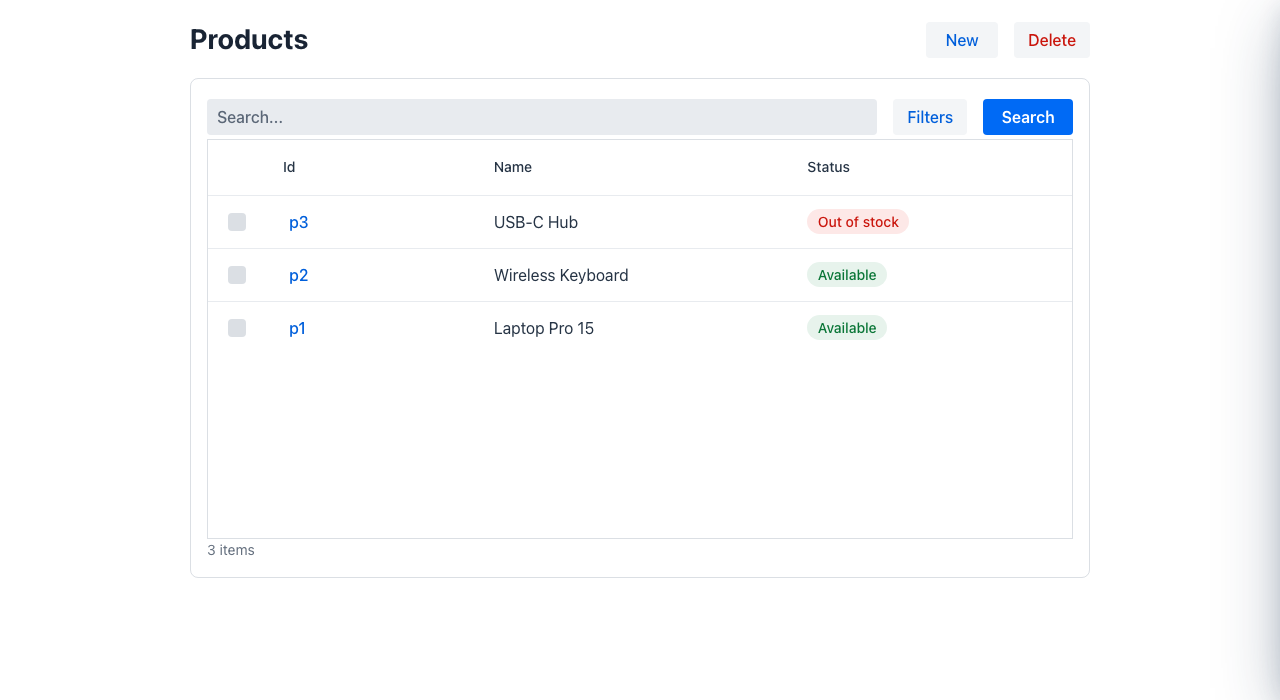
Most business applications end up as two applications:
backend → API → frontend → duplicated model → duplicated validationThat means duplicated concepts, duplicated validation, glue code, and one more project to keep alive.
model (YAML · visual editor · Java · C# · Python) → one wire model → browser · phone · desktopYou declare what a screen contains; Mateu derives the screen. The model is files in your repository, reviewed and released like any other code — not a project in somebody’s cloud.
Author it your way
YAML and the visual editor with no code, or Java, C# or Python — or both on one screen.
Render it anywhere
Vaadin and Oracle Redwood on the web (also embedded in Visual Builder apps), the Mateu mobile app, and IntelliJ on the desktop.
Serve it from anything
A backend in Java (5 frameworks), .NET or Python — or a static bundle on a CDN with no backend.
Compose it
Federate UIs owned by different teams and domains into one console.
Whichever way you write it, a Mateu UI is built from the same blocks: a mount at a base path, an app shell and its menu, routes, pages (layouts of components, with optional partials), actions, data sources and the state they fill, plus the cross-cutting field types, translations, environments, access rules and project settings. What a Mateu UI is made of shows them on one diagram, with a small product catalogue as the running example.
What those blocks look like to the people using the app (the shell, the six page types, the component catalogue and how to extend it) is the UX guide.
Admin panels
CRUD-heavy backoffice screens over your model or your APIs.
Consoles over APIs
A 100 % static UI over REST APIs, the way cloud consoles are built.
Distributed backoffices
Each service or domain owns its UI; a shell composes them.
Embedded UI
Mateu screens inside React, Vue, Angular, Visual Builder or plain HTML.
Wondering how this differs from a React SPA, Vaadin or a low-code platform? See Mateu vs the traditional stack and Mateu vs visual builders.